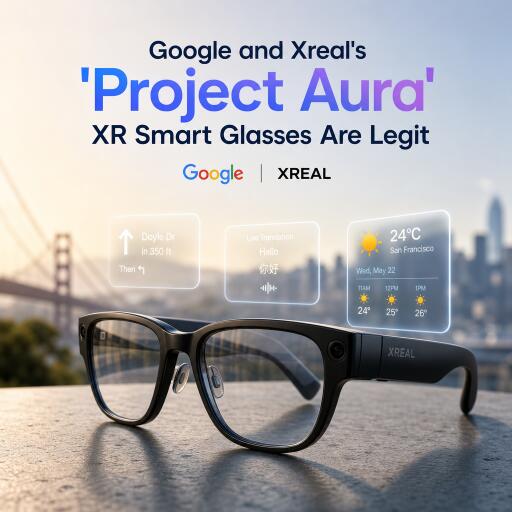

Google and Xreal’s ‘Project Aura’ XR Smart Glasses Are Legit
Project Aura is the clearest sign yet that lightweight XR smart glasses are ready to step out of the prototype lab. Built on Google’s Android XR platform and developed with Xreal, these glasses don’t try to be a full-blown headset—and that’s exactly why they’re compelling. After a hands-on demo, it’s obvious they’re prioritizing comfort, practicality, and speed over the cocooned immersion of a visor.
Design that favors everyday use
Slip them on and they feel surprisingly close to Xreal’s own AR frames: light, compact, and easy to forget you’re wearing. Three forward-facing cameras are tucked neatly into the front, and a cable runs from the left arm to a “compute puck” you wear on a lanyard. The puck handles the heavy lifting, and even includes a built-in trackpad—though that wasn’t available to test during the demo. A red button on the right arm controls dimming, letting you tune the transparency of the real world behind your apps.
There’s no eye tracking here. Interactions rely on head-directed targeting plus hand tracking, which keeps the hardware simple and the glasses featherweight. You’ll look at what you want, then reach out to act on it.
Big field of view, small footprint
The surprise is just how expansive the visuals feel for glasses this small. The field of view is quoted at 70 degrees—wide enough to comfortably dock multiple apps in front of you. During the demo, three windows sat side-by-side without crowding, and it’s possible to open up to five. A game board hovered above them while productivity apps anchored below, creating a layered workspace that felt natural to navigate.
Brightness and clarity were strong; text and UI elements looked sharp rather than gauzy or pixelated. Specific panel specs weren’t provided, but what matters more here is the overall legibility and stability of the image—and both already feel ready for daily tasks.
Android XR with real utility, not just sizzle
Hand tracking is simple: pinch to select, pinch and hold to drag, and grab a window’s corner to resize—very desktop-like, minus the mouse. Tracking isn’t perfect yet; a few pinches went unrecognized. But when it worked, it was quick and intuitive, letting me toss windows around and build a personal command center in the air.
Google’s Gemini intelligence features are baked into the experience. Looking at physical objects on a nearby shelf and asking questions produced contextual information overlaid in space. It’s the kind of on-demand understanding that makes AR feel useful instead of gimmicky—more assistant than novelty.
Playable gestures and promising game mechanics
The most fun moment came in a tabletop-style demo. Making fists with both hands let me grab the entire level, rotate it, and zoom in or out; a pinch moved my character; opening my right palm revealed a fan of “cards” to drag onto the board for actions and abilities. It’s early, and faster, more forgiving hand recognition will be key, but the blueprint for genuinely new kinds of gameplay is here. If developers lean into this, we could see spatial games that feel tactile without requiring controllers.
Laptop extender—early but intriguing
Plugging a USB-C cable from a laptop into the puck turned the glasses into an external monitor. In this early build, moving apps between the physical display and the floating virtual screen wasn’t reliable, so this mode clearly needs polish. Still, the concept is powerful: a private, portable second screen you can summon anywhere.
Less headset, more computer you can wear
These glasses don’t try to wall you off from the room, and that’s their strength. You get a broad, configurable workspace, genuine portability, and none of the bulk or social friction that comes with a face-hugging visor. The compromise is obvious: they won’t deliver the sealed, theater-like immersion of a high-end headset. But for emails, chats, docs, and quick 3D interactions, they already feel like the right tool.
What still needs work
- Hand tracking consistency: Good, but not bulletproof. More responsive pinch detection would elevate everything.
- Window management stability: Mostly smooth, with occasional misses when grabbing or resizing.
- External display mode: Concept lands, execution needs tightening.
Release timing, price, and the bigger picture
Pricing and an exact launch date haven’t been announced. Given how complete the hardware feels, the remaining lift is mostly software fit-and-finish. The price will make or break momentum: there’s little appetite for another ultra-premium device. If the cost lands sensibly and Android XR smooths out before release, Project Aura could set the bar for what mainstream XR glasses should be—light, capable, and actually useful.
Bottom line
Project Aura doesn’t chase the maximalism of a full XR headset. It goes after the sweet spot: a wide, clear field of view; fast, simple gestures; AI that helps rather than hypes; and a form factor you won’t dread wearing. It’s not trying to replace reality—it’s trying to enhance the way you already work and play in it. And that, finally, feels like the right kind of XR.